Secure Square payment
Pay your invoice, deposit, or final balance.
Use this page after you receive a quote or invoice from Net Desk IT Services. Payments are completed through Square's secure checkout.
1Have your invoice readyUse the invoice number and amount shown on your invoice or quote.
2Open Square checkoutClick the payment button or scan the QR code with your phone camera.
3Enter payment detailsEnter your invoice number, payment amount, and card details directly on Square.
Payment Options
Choose the easiest way to open the secure Square payment page.
Pay online
Continue to Square to pay an invoice, deposit, or remaining balance.
Continue to Secure Square CheckoutYou will leave this website and complete payment on Square's secure checkout page.
Having trouble with the button? Copy this payment link: https://checkout.square.site/merchant/ML4M5ZKWGAWTH/checkout/QTLJUNBTUNKT7IPXSY4ZHJD3
Scan to pay
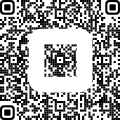
Open your phone camera and scan the QR code.
Please enter your invoice number on the Square checkout page so your payment can be matched correctly. If you are paying a deposit, enter the deposit amount shown on your quote.
1Use the same email address you used when requesting service.
2Enter the payment amount exactly as shown on your invoice or quote.
3Contact us before paying if the invoice number or amount is unclear.